3. Torque Data Analyzer
This analyzer determines average torque and torque ripple created by an electric machine.
3.1. Model Background
Given an array of torque values \(\tau\), average torque and torque ripple are calculated as follows
where \(\tau_\text{avg}\) is calculated by taking the average of \(\tau\). Torque ripple \(\tau_\text{ripple}\) indicates the maximum deviation from the average torque as a ratio. It can also be represented as in % when multiplied by 100.
3.2. Input from User
User is required to provide an array of torque values (against time or rotor position) to create a ProcessTorqueDataProblem object.
Arguments |
Description |
Units |
|---|---|---|
torque |
Array of torque values |
Any (Nm, kNm, etc.) |
3.3. Output to User
Torque data analyzer returns the following scalar values:
Output |
Description |
Units |
|---|---|---|
torque_avg |
Average torque |
Same as input |
torque_ripple |
Torque ripple |
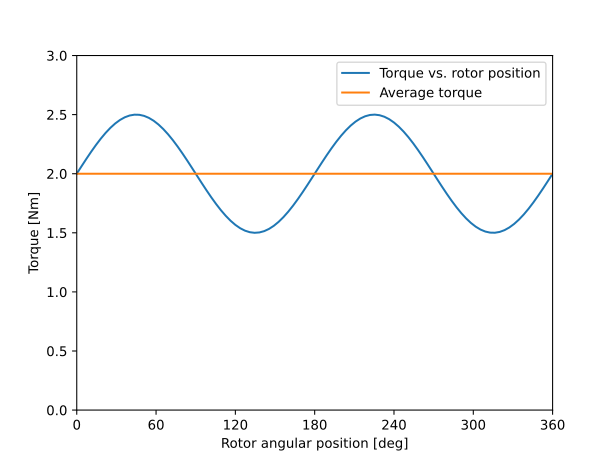
Example code using torque data analyzer is provided below. Torque as a function of rotor position is defined, average torque and torque ripple are calculated, and torque and its average are plotted. Note that, typically, torque array comes directly from FEA analysis results.
import numpy as np
import matplotlib.pyplot as plt
from eMach.mach_eval.analyzers.torque_data import (
    ProcessTorqueDataProblem,
    ProcessTorqueDataAnalyzer,
)

# define torque (typically an output of FEA analysis)
theta = np.linspace(0, 2*np.pi,100)
torque = 2 + 0.5 * np.sin(2 * theta)

# define problem and analyzer
torque_problem = ProcessTorqueDataProblem(torque)
torque_analyzer = ProcessTorqueDataAnalyzer()

# analyze problem
torque_avg, torque_ripple = torque_analyzer.analyze(torque_problem)

# plot torque vs. rotor position and its average
fig1 = plt.figure()
ax = plt.axes()
fig1.add_axes(ax)
ax.plot(theta * 180 / np.pi, torque)
ax.plot(theta * 180 / np.pi, torque_avg * np.ones(len(torque)))
ax.set_xlabel("Rotor angular position [deg]")
ax.set_ylabel("Torque [Nm]")
ax.set_xbound(0, 360)
ax.set_ybound(0, 3)
ax.set_xticks(np.linspace(0, 360, 7))
ax.legend(['Torque vs. rotor position','Average torque'])
plt.show()
After running this example code, we expect to get torque_avg = 2 Nm, torque_ripple = 0.25 (25%), and the following plot: