4. Maintainer Guidelines
This guide is intended to describe the protocol adopted for the eMach code development. The eMach code base uses: git for version control; semantic versioning for release labeling.
Tip
Read about semantic versioning on the main semver.org website. This greatly helps to explain the concepts below.
4.1. Branches in git
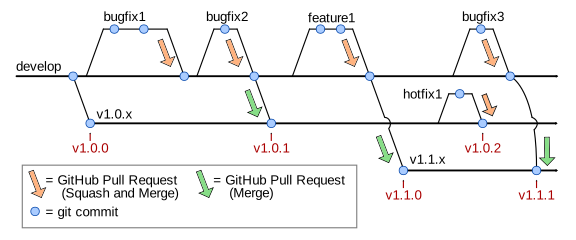
All development intended to impact a future release is done on topic branches from the latest develop branch.
This applies to bug fixes, feature additions, and/or major changes.
The develop branch is not stable – the latest commits to develop might yield unstable code which is still in testing.
Regular open-source development practice is followed – pull requests PRs are used to review new code and then eventually are merged into develop.
Merges into
developshould useSquash and Mergevia GitHub’s online interface.Merges into release branches should use the simple
Mergecommit via GitHub’s online interface.
Each PR should be small enough to reasonably review – if a PR has too many files changed or covers too large of scope, the developer will be asked to reduce the PR size by creating multiple smaller PRs.
4.2. Releases
Per semantic versioning, there are three types of releases:
Major
Minor
Bug fix
To create a release, a snapshot of the code is taken and labeled as: vA.B.C where A denotes the major release number, B denotes the minor number, and C denotes the bug fix number. For example, a release might be called v1.0.0 or v1.5.12.
A so-called release branch refers to a labeled major and minor release, but unspecified bug fix.
The naming pattern is: vA.B.x where A and B are numbers and x denotes any bug fix number.
For example, the initial release branch is called v1.0.x.
4.3. Release Planner
eMach uses a GitHub Project Board to track and schedule issues
(bug fixes and features) for release. All new issues are automatically added to the project board with a status of Backlog.
The eMach development team triages these issues to either Future Feature or Future Bug Fix. When a PR implements
code to address any issue, the developer (with help from reviewers) updates the issue’s status to the upcoming version of eMach
that they believe the issue belongs in. This has implications for when (and into which branch) the PR should be merged.
Guidelines for scheduling issues into releases are as follows:
Issues triaged as
Future Bug Fixshould correspond to Bug Fix releasesFuture Featureissues are either Minor or Major releases, depending on if the code is backwards compatible.Website changes that consist of correcting type-o’s or existing code belong in a Bug Fix release while changes that affect the workflow of contributing to eMach belong in a Minor or Major release.
It is preferred to do timely releases (with only 1 or 2 issues) than to do infrequent, large releases.
4.4. Change Log
A ./CHANGELOG.md file is maintained to document incremental changes in each release of the project.
Each entry in the change log should have a markdown heading of the version number (VA.B.x) followed by
a bullet list of changes in the style of commit messages based on the issues that are being released. The
overarching principle is that the list should be understandable and useful to the people who develop the
code.
The following rules should be used to draft this message:
Keep each bullet brief
Always start each bullet with a verb. Use the same verbs as much as possible.
FixandAddshould be the most common.Rename,Remove, andExtendare also acceptable.Sort the bullets by the first word. Always list
Fixfirst, thenAdd.Ideally, each of the bullets corresponds to an issue/PR. However, often this leads to too repetitive of a list. It is more important that the list be brief, so consolidate issues into a single bullet as makes sense.
See the AMDC Firmware Project Repository for examples of effective changelog entries.
4.5. Procedure
Tip
Refer to the diagram above for a graphical representation of how the git branching should work.
The procedure for creating a new release is mostly common for all three types (major, minor, bug fix):
Update code via topic branches which are based on
developand merge updates intodevelopEnsure development has stablized on the
developbranchEnsure thorough testing of the latest
developbranch codeReview the issues scheduled for this release on the eMach Release Planner. Any issues that are not completed should be rescheduled to a future release
Create a label corresponding to the release (
vA.B.x) and assign this to all issues being releasedCreate and merge PR as the final commit to
developthat updates the./CHANGELOG.mdfile with documentation about the new release. See Change Log for instructions on drafting this. The PR should be namedAdd changelog notes for vA.B.x releaseDepending on which type of release, follow steps in either Bug Fix or Minor or Major
Follow the steps in Tag and Release
For minor or major releases, add a release version to ReadTheDocs by navigating to
Versionsand clickingActivateon the newly created tagVA.B.0.
4.5.1. Bug Fix
For a new bug fix release, a release branch should already exist.
To publish the bug fix, simply merge the bug fix from develop into the appropriate release branches.
This should be done via a PR on GitHub and the PR should perform a regular merge commit, not a Squash + Merge.
Attention
You might need to merge the bug fix into multiple release branches, depending on how widespread the bug is. Always merge in one direction, from develop to the release branches.
Occasionally, a bug might need to be fixed in a previous release branch, but does not exist in the latest develop branch.
In this case, do not change develop – simply fix the bug where it needs to be fixed.
This is depicted in the above diagram as the hotfix1 branch.
4.5.2. Minor or Major
For a new minor or major release, a new release branch needs to be created.
Create a new release branch from
developand call itvA.B.xUpdate GitHub’s default repo branch to be the latest release branch which was just created
Update the documentation website to reflect the minor or major breaking changes
4.5.3. Tag and Release
After following the above steps, the release branch(es) will hold the latest stable code release. Users which checkout the release branch will have access to the code.
Git tag(s) need to be created and GitHub release(s) need to be created.
Create git tag(s) pointing to the merge commit(s) on the release branch(es). If the new code was only merged to one release branch, only one tag will be created. However, if a bug fix was merged to multiple release branches, then the appropriate version number should be used to tag each merge commit.
For each new git tag, create a GitHub Release with the same name as the tag and include a description of the changes that is identical to the changelog contents.