6. BSPM Optimization Tutorial
Goal: Leverage capabilites of
mach_optandmach_evalto perform multi-objective, multi-physics optimization of bearingless surface permanent magnet machinesComplexity: 4/5
Estimated Time: 45 - 60 min
This tutorial demonstrates how to perform a multi-objective, multi-physics optimization of BSPM machines using eMach. By the end of this
tutorial you will be able to:
run multi-objective optimizations using
eMachfor a wide range of electric machines;post-process optimization data to understand a design space;
select and share candidate designs from a design space.
6.1. Requirements
Python packages installed as discussed in Pre-requisites
Installation of JMAG v19 or above
Personal repo using
eMachas submodule established (see Rectangle Tutorial)BSPM evaluation tutorial completed
6.2. Background
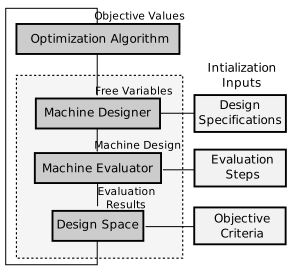
The mach_opt module of eMach provides classes to interface with the Python optimization package Pygmo. This module has been
designed considering the optimization workflow provided below. In this tutorial, we will go over how users can develop their own classes to
follow this workflow and leverage mach_opt for optimization by going through an example of multi-physics BSPM optimization using eMach.
6.3. Step 1: Create BSPM Designer
Nearly all population-based optimization workflows function by creating a set of Free Variables, and thereafter, evaluating the resulting
fitness corresponding to these variables. There are a number of steps involved in this process. Creating a Design from the set of
Free Variables is the first step. The class that performs this function is called the Designer in eMach terminology.
To create a Designer, we must first define the input Free Variables and the desired output Design. In this tutorial,
Input
Free Variables: we are using a set of 11 variables that define the rotor and stator geometry. TheseFree Variablesare \(\delta_e\), \(r_{ro}\), \(\alpha_{st}\), \(d_{so}\), \(w_{st}\), \(d_{st}\), \(d_{sy}\), \(\alpha_m\), \(d_m\), \(d_{mp}\), and \(d_{ri}\) dimensions. Readers can refer to the BSPM machine document to understand the physical dimensions corresponding to theseFree Variables.Output
Design: a BSPM design object which consists of a BSPM Machine and its corresponding operating point. The BSPMDesignerhas anArchitectto create theBSPM_MachinefromFree Variablesand aSettings_Handlerto create theBSPM_Machine_Oper_Ptobject. In this tutorial, the operating point is independent of theFree Variables. As a result, theSettings_Handleralways returns the sameBSPM_Machine_Oper_Ptobject.
To create the BSPM Designer, copy the bspm_architect.py, bspm_settings_handler.py, and bspm_designer.py files from the
examples/mach_opt_examples/bspm_opt folder to your root directory. Update the import statements found at the top of each module as shown
below to ensure the code works with the files in the new location.
For bspm_architect.py:
import numpy as np

from eMach.mach_eval.machines.bspm import BSPM_Machine
from eMach.mach_eval.machines.bspm.winding_layout import WindingLayout
For bspm_settings_handler.py:
from eMach.mach_eval.machines.bspm.bspm_oper_pt import BSPM_Machine_Oper_Pt
For bspm_designer.py:
from bspm_architect import BSPM_Architect1
from eMach.mach_eval.machines.bspm.bspm_specification import BSPMMachineSpec
from eMach.mach_eval.machines.materials.electric_steels import Arnon5
from eMach.mach_eval.machines.materials.jmag_library_magnets import N40H
from eMach.mach_eval.machines.materials.miscellaneous_materials import (
    CarbonFiber,
    Steel,
    Copper,
    Hub,
    Air,
)
from bspm_settings_handler import BSPM_Settings_Handler
from eMach.mach_eval import MachineDesigner
6.4. Step 2: Create BSPM Design Evaluator
Simply use the multi-physics BSPM design Evaluator developed in the BSPM Evaluation Tutorial in this
step. Structural, electromagnetic, and thermal performance of BSPM designs will be analyzed using this Evaluator. The coil temperature
limit set in Step 2.4 of BSPM Evaluation Tutorial can be reduced from \(300^\circ \, \rm C\) to \(150^\circ \, \rm C\) to optimize for a more realistic BSPM design.
6.5. Step 3: Create BSPM Optimization Design Space
Finally, before running the optimization, the number of optimization objectives, the objectives themselves, and the bounds for the Free
Variables must be decided upon. This information is held within the BSPMDesignSpace object.
The optimization is run considering three objectives. This includes minimizing the weighted sum of torque and force ripple, and maximizing efficiency, power density. The class is configured such that the bounds are passed in as an argument during instantiation to provide users with the freedom of setting the bounds within the actual optimization script.
To create the BSPMDesignSpace class, copy the bspm_ds.py file from the examples/mach_opt_examples/bspm_opt folder. The file can be used as-is.
6.6. Step 4: Update mach_opt DataHandler (if required)
During optimization, a huge dataset of BSPM designs and information related to their performance is created. It is important to save this data as the optimization runs so that one can resume the optimization in case it terminates prematurely due to unforseen errors. This data is also useful for post-processing after an optimization is complete.
The base DataHandler provided within mach_opt implements the basic functionalities for optimization data handling, including saving and loading data using Pickle and extracting Pareto optimal designs. Depending on the optimization, one may need to add additional functionality, especially for
selecting candidate designs for further investigation. This can be achieved by inheriting the mach_opt DataHandler class and adding
the methods required for candidate design selection and extraction.
The my_data_handler.py file in examples/mach_opt_examples/bspm_opt folder provides an example implementation of a custom DataHandler class. Copy this file to your working directory and update the import statement as shown below.
import eMach.mach_opt as mo
6.7. Step 5: Run Optimization
Finally, the multi-objective, multi-physics optimization can be run by combining the modules created up to this step.
The code snippet provided below shows how to run this optimization. This code should be saved to a new Python file named bspm_optimization.py.
An important consideration while running the optimization is the bounds for the Free Variables. This can be set by considering an analytically designed
machine as the baseline for an existing machine and applying scaling factors on its dimensions to get the bounds.
Run bspm_optimization.py. The optimization should run for as many generations as required to obtain the Pareto Front. If the optimization terminates before this is achieved due to unexpected errors, simply run the script again and the optimziation will resume from the last saved generation (based on latest_pop.csv).
import os
from bspm_designer import designer
from bspm_evaluator import bspm_evaluator
from bspm_ds import BSPMDesignSpace
from eMach.mach_opt import DesignProblem, DesignOptimizationMOEAD
from my_data_handler import MyDataHandler

# set bounds for pygmo optimization problem
dims = (
    0.003,
    0.012,
    45,
    5.5e-3,
    9e-3,
    17e-3,
    13.5e-3,
    180.0,
    3e-3,
    1e-3,
    3e-3,
)

bounds = [
    [0.5 * dims[0], 2 * dims[0]],  # delta_e
    [0.5 * dims[1], 2 * dims[1]],  # r_ro    this will change the tip speed
    [0.2 * dims[2], 1.1 * dims[2]],  # alpha_st
    [0.2 * dims[3], 2 * dims[3]],  # d_so
    [0.2 * dims[4], 3 * dims[4]],  # w_st
    [0.5 * dims[5], 2 * dims[5]],  # d_st
    [0.5 * dims[6], 2 * dims[6]],  # d_sy
    [0.99 * dims[7], 1 * dims[7]],  # alpha_m
    [0.2 * dims[8], 2 * dims[8]],  # d_m
    [0 * dims[9], 1 * dims[9]],  # d_mp
    [0.3 * dims[10], 2 * dims[10]],  # d_ri
]

# create optimization Design Space object
opt_settings = BSPMDesignSpace(3, bounds)

# create optimization Data Handler
path = os.path.dirname(__file__)
arch_file = path + r"\opti_arch.pkl"  # specify file where archive data will reside
des_file = path + r"\opti_designer.pkl"
pop_file = path + r"\latest_pop.csv"  # csv file holding free variables of latest population
dh = MyDataHandler(arch_file, des_file)  # initialize data handler with required file paths

# create pygmo Problem
design_prob = DesignProblem(designer, bspm_evaluator, opt_settings, dh)
# defin pygmo MOEAD optimization
design_opt = DesignOptimizationMOEAD(design_prob)

# define population size and number of generations
pop_size = 78
gen_size = 20

# load latest population
population = design_opt.load_pop(filepath=pop_file, pop_size=78)
# create random initial population if no prior data exists
if population is None:
    print("NO EXISTING POPULATION TO LOAD")
    population = design_opt.initial_pop(pop_size)

# RUN OPTIMIZATION
pop = design_opt.run_optimization(population, gen_size, pop_file)
6.8. Step 6: Optimization Post-Processing
To fully leverage optimization, users must be able to effectively analyze the resulting data. This includes extracting the Pareto front,
evaluating trends in the Free Variables, and selecting candidate designs.
Copy the my_plotting_functions.py file from the examples/mach_opt_examples/bspm_opt folder to get the custom functions created for plotting the Pareto front and Free Variables of this optimization.
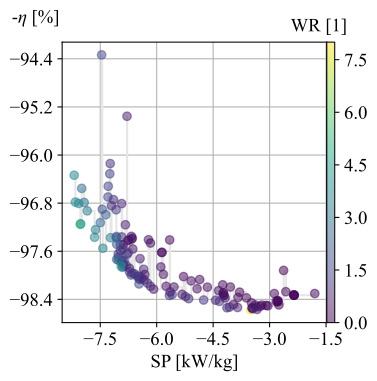
Create a file named plot_script.py. Copy and paste the code provided below to plot the Pareto front. As this optimization has three objectives, the marker color is used to indicate the value of the third objective, weighted ripple.
import os

from my_data_handler import MyDataHandler
from my_plotting_functions import DataAnalyzer

path = os.path.dirname(__file__)
arch_file = path + r'/opti_arch.pkl'  # specify path where saved data will reside
des_file = path + r'/opti_designer.pkl'
dh = MyDataHandler(arch_file, des_file)  # initialize data handler with required file paths

fitness, free_vars = dh.get_pareto_fitness_freevars()

da = DataAnalyzer(path)
da.plot_pareto_front(points=fitness, label=['-SP [kW/kg]', '-$\eta$ [%]', 'WR [1]'])
An example Pareto plot obtained from running the optimization script from step 5 is shown below:
To plot trends in Free Variables from the beginning to the end of the optimization, copy and paste the code provided below to plot_script.py.
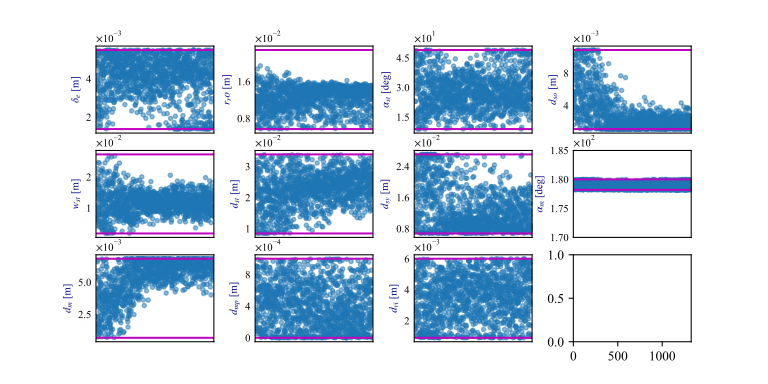
The blue markers provide the value of the Free Variable corresponding to a design and the red lines indicate the bounds corresponding to
each free variable. The bounds should be set such that they are not run into during optimization if possible.
fitness, free_vars = dh.get_archive_data()
var_label = [
            '$\delta_e$ [m]',
            "$r_ro$ [m]",
            r'$\alpha_{st}$ [deg]',
            '$d_{so}$ [m]',
            '$w_{st}$ [m]',
            '$d_{st}$ [m]',
            '$d_{sy}$ [m]',
            r'$\alpha_m$ [deg]',
            '$d_m$ [m]',
            '$d_{mp}$ [m]',
            '$d_{ri}$ [m]',
            ]

dims = (0.003, 0.012, 45, 5.5e-3, 9e-3, 17e-3, 13.5e-3, 180.0, 3e-3, 1e-3, 3e-3)
# # bounds for pygmo optimization problem
bounds = [
    [0.5 * dims[0], 2 * dims[0]],  # delta_e
    [0.5 * dims[1], 2 * dims[1]],  # r_ro    this will change the tip speed
    [0.2 * dims[2], 1.1 * dims[2]],  # alpha_st
    [0.2 * dims[3], 2 * dims[3]],  # d_so
    [0.2 * dims[4], 3 * dims[4]],  # w_st
    [0.5 * dims[5], 2 * dims[5]],  # d_st
    [0.5 * dims[6], 2 * dims[6]],  # d_sy
    [0.99 * dims[7], 1 * dims[7]],  # alpha_m
    [0.2 * dims[8], 2 * dims[8]],  # d_m
    [0 * dims[9], 1 * dims[9]],  # d_mp
    [0.3 * dims[10], 2 * dims[10]],  # d_ri
]

da.plot_x_with_bounds(free_vars, var_label, bounds)
The plots showing trends in Free Variables from this optimization archive are shown below:
Finally to select a candidate design, add dh.select_designs() line to plot_script.py. You will need to modify the
design selection criteria in my_data_handler.py to get designs having the performance you desire.
After determining the design you wish to analyze in further detail, use the following code to save it to a Pickle file for future reference. Code to extract relevant information from the Pickle file is also provided. A cross-section of the selected machine design from the Pareto front is also provided below. This machine has a power density of 7 kW/kg, efficiency of 97.6 %, and a weighted ripple of just 1.2 pu. The pickle file for this design is available in the examples/mach_opt_examples/bspm_opt folder as proj_1207_.pkl.
Note
You can validate the performance of this design by loading the Pickle file and passing the extracted design into the BSPM
Evaluator.
# check designs which meet required specs
dh.select_designs()

# proj_1207_ selected based on performance
proj_name = 'proj_1207_'
# load proj_1207_ design from archive
proj_1207_ = dh.get_design( proj_name)
print(proj_name, "d_st =", proj_1207_.machine.d_st)

# save proj_1207_ to pickle file
object_filename = path + "/" + proj_name + r'.pkl'
dh.save_object(proj_1207_, object_filename)

# read proj_1207_ design from pickle file
proj_read = dh.load_object(object_filename)
print("From pickle file, d_st =", proj_read.machine.d_st)

Note
The examples/mach_opt_examples/bspm_opt folder provides working code for the tutorial discussed here. You can run the
bspm_optimization.py script here to optimize the BSPM machine. The plot_script.py file in this folder plots the resulting
data as is discussed in this example.
6.9. Conclusion
Congratulations! You have successfully used eMach to run a multi-physics, multi-objective optimization! You can now
attempt optimizing BSPM machines for different objectives and compare the resulting designs from those obtained with this
optimization.