1. Rectangle Optimization Tutorial
Goal: Understand base
mach_optclassesComplexity 2/5
Estimated Time 20 min
This tutorial demonstrates how to run a simple optimization of a rectangle using eMach. By the end of this tutorial you will:
Be able to run simple optimizations using
eMach.Construct the primary classes used in the
mach_optmodule
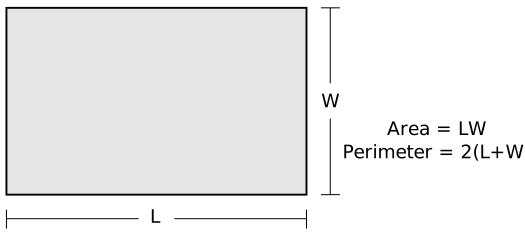
In this tutorial a rectangle will be optimized to maximize its area while minimizing its perimeter. This is a common first multi-objective optimization, and is used here to demonstrate the base functionality of eMach.
1.1. Tutorial Requirements
This is the first tutorial so the only requirement is:
All required Python packages are installed on system. (See Pre-requisites)
1.2. Step 1: Create new repository
First a personal repository for this tutorial will be created. This repository will hold all the user written code developed in these tutorials. Open a new empty folder and input the following code into git-bash to initialize the repository.
git init
1.3. Step 2: Clone eMach as a sub-module
In order to utilize the eMach codebase, it must first be installed as a sub-module in your repository. In the root folder of your repository open a git bash and input the following command line:
git submodule add https://github.com/Severson-Group/eMach.git
This should add the current develop branch of eMach as a folder in the base layer of your personal repository.
1.4. Step 3: Create main optimization file
In the root folder of your repository, create a Python file named main.py. All the code used in this example will be written in this file. This will be the file where the user inserts their custom code and runs the optimization. At the top of main.py add the following import statements:
from matplotlib import pyplot as plt
import pygmo as pg
from eMach import mach_opt as mo
These imports give the user access to plotting capabilities from matplotlib, the open-source optimization library pygmo, and the base protocols and classes in the mach_opt modules of eMach.
1.5. Step 4: Create required mach_opt classes
In this step the user will fulfill the required Protocols from the mach_opt repository needed to define the evaluation. The three protocols discussed in this tutorial are the:
- Designer
The
Designerprotocol converts an input tuple into adesignobject.- Evaluator
The
Evaluatorevaluates thedesignobject for a set of criteria defined in theevaluatefunction.- DesignSpace
The
DesignSpacehandles converting the results of the evaluation into the objective variables.
The final protocol of the mach_opt modules, the DataHandler, is not discussed in this example.
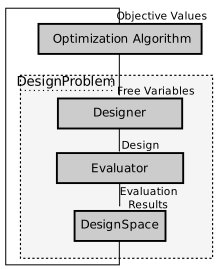
The general flow of information in the des_opt module is shown in the following flow chart. The optimization algorithm will pass a set a free variables to the DesignProblem object, which in turn will be provided to the Designer. The Designer will convert the free variables into a design object which is then passed to the Evaluator. The Evaluator is responsible for evaluating the design object. The results of the evaluation, are then handed to the DesignSpace which converts the results of the evaluation into objective values in a form that the optimization algorithm can handle.
1.5.1. Step 4.1: Create Designer and Design class
The Designer protocol of the mach_opt module is designed as a contract which defines how the optimization will convert the free variables tuple from pygmo to a design object. The design object is a container which holds all the information about a design known at the start of the evaluation process. Only one function, create_design(x), is required to be implemented to fulfill the Designer protocol.
Copy the following code into your main.py file. These two classes fulfill the Designer and Design protocols specified in the mach_opt repository. This code will convert the free variable tuple x provided by pygmo into a Rectangle object to be evaluated.
class RectDesigner(mo.Designer):
    """Class converts input tuple x into a Rectangle object"""

    def create_design(self,x:tuple)->"Rectangle":
        """
        converts x tuple into a Rectangle object.

        Args:
            x (tuple): Input free variables.

        Returns:
            rect (Rectangle): Rectangle object
        """

        L=x[0]
        W=x[1]
        rect=Rectangle(L,W)
        return rect
class Rectangle(mo.Design):
    """Class defines a rectangle object of Length and width

    Attributes:
        L (float): Length of Rectangle.
        W (float): Width of Rectangle.
    """

    def __init__(self,L:float,W:float):
        """Creates Rectangle object.

        Args:
            L (float): Length of Rectangle
            W (float): Width of Rectangle

        """
        self.L=L
        self.W=W
In this example, the Designer protocol is implemented by the RectDesigner class. For this example, the required create_design(x) method of the Designer protocol extracts the length and width from the free variables and passes them into the Rectangle object (this optimization’s Design object).
Note
In this example both the RectDesigner and Rectangle classes explicitly inherent the base protocols from mach_opt. Since the parent classes are Protocols, child classes do not need to explicitly inherit the parent, just the required methods must be implemented.
1.5.2. Step 4.2: Create Evaluator class
The Evaluator protocol of mach_opt is used to define the the evaluation process for an optimization. There is only one required method for an Evaluator protocol: evaluate(design). In this example, the RectEval class fulfills the Evaluator protocol. The evaluate(design) method is used to calculate the area and perimeter of the Rectangle object created by the RectDesigner.
Copy the following code block into the main.py file. This code defines the Evaluator class which will be used to evaluate the rectangle for its area and perimeter.
class RectEval(mo.Evaluator):
    """"Class evaluates the rectangle object for area and perimeter"""

    def evaluate(self,rect):
        """Evalute area and perimeter of rectangle

        Args:
            rect (Rectangle): Rectangle Object

        Returns:
            [A,Per] (List[float,float]): Area and Perimeter of rectangle

        """
        A=rect.L*rect.W
        Per=2*rect.L+2*rect.W
        return [A,Per]
Note
The results of an Evaluator are not required to be returned in a set form. However, for complicated optimization the use of dictionary objects can be helpful to ensure proper bookkeeping of the results.
1.5.3. Step 4.3: Create DesignSpace class
The final protocol implemented in this example, is the DesignSpace. The DesignSpace protocol is used to convert the results of the evaluation process back to a form which pygmo can utilize. There are four required methods for the DesignSpace protocol which must be implemented.
- get_objectives(valid_constraints, full_results)
This method must extract the required objective values for the optimization from the results of the evaluation process.
- check_constraints(full_results)
This method is used to apply a death penalty constraint if needed for the optimization. This is not used in this example.
- n_objs()
This method must be implemented using Python’s
propertydecorator. it returns the number of objective values the optimization returns. This values is required bypygmoto run the optimization.- bounds()
This method must also be implemented using Python’s
propertydecorator. The bounds method must return a 2xN tuple which holds the lower and upper bounds for the free variables.pygmowill look at this method to determine the number and range of free variables to use.
The RectDesignSpace class is used in this example to implement the DesignSpace protocol. Once again copy the following code section into the main.py file. The primary method on interest in this example is the get_objectives method. For this tutorial, the full_results object returned by the Evaluator class is a list of the area and perimeter of the rectangle. The goal of the optimization is to maximize the area and minimize the perimeter, however pygmo will always attempt to minimize the objective values. To circumvent this, the DesignSpace class returns a negative area.
class RectDesignSpace(mo.DesignSpace):
    """Class defines objectives of rectangle optimization"""

    def __init__(self,bounds,n_obj):
        self._n_obj=n_obj
        self._bounds=bounds

    def get_objectives(self, full_results) -> tuple:
        """ Calculates objectives from evaluation results


        Args:
            results (List(float,float)): Results from RectEval

        Returns:
            Tuple[float,float]: Maximize Area, Minimize Perimeter
        """
        Area = full_results[0]
        Perimeter = full_results[1]
        return (-Area,Perimeter)

    def check_constraints(self, full_results) -> bool:
        return True

    @property
    def n_obj(self) -> int:
        return self._n_obj

    @property
    def bounds(self) -> tuple:
        return self._bounds
1.5.4. Step 4.4: Create dummy DataHandler class
For this example, we will not be implementing a DataHandler class to save the optimization results. However eMach still requires a class with the functions calls to be created. The following code block should be copied into main.py as a dummy DataHandler class.
class DataHandler:
    def save_to_archive(self, x, design, full_results, objs):
        """dummy data handler"""
        pass
    def save_designer(self, designer):
        pass
1.6. Step 5: Initialize custom classes
Now that the custom classes implementing the prescribed protocols from mach_opt have been defined. The user must create instances of the classes to be used for the optimization. For this example, the RectDesigner and RectEval classes don’t require any initialization variables to be passed in. The RectDesignSpace object requires the the bounds of the free variables, and the number of objectives to be passed in on initialization. As noted previously, the bounds object is a 2xN tuple that gives the lower and upper bounds for the free variables. For this example, we are setting the bounds for the length and width to be 0 to 1.
Copy the following code into the bottom of main.py. This code will create instances of the defined Designer, Evaluator, and DesignSpace classes from earlier steps.
###############################
### Create mach_opt objects ###
###############################
des=RectDesigner()
evaluator=RectEval()
dh=DataHandler()
## Define optimization bounds and number of objectives
bounds=([0,0],[1,1])
n_obj=2
## Inject bounds and number of objectives into DesignSpace
ds=RectDesignSpace(bounds,n_obj)
1.7. Step 6: Inject custom classes into DesignProblem
In the mach_opt module, the DesignProblem is a concrete class which is used to directly interface with pygmo optimizations. The user does not need to modify any code in the DesignProblem class, they must just initialize an instance, by passing in their custom defined Designer, Evaluator, DesignSpace, and DataHandler objects. To create the DesignProblem used in this example, copy the following code into the bottom of main.py.
machDesProb=mo.DesignProblem(des,evaluator,ds,dh)
1.8. Step 7: Set up optimization code
In mach_opt the DesignOptimizationMOEAD class is provided to run a MOEAD optimization problem. This class is simply a container for pygmo optimization code. Using the following code block, an optimization can be run using the user created DesignProblem object from the previous step. This optimization is setup to run for 10 generations with a population of 50 designs.
opt=mo.DesignOptimizationMOEAD(machDesProb)
pop_size=50
pop=opt.initial_pop(pop_size)
gen_size=10
pop=opt.run_optimization(pop,gen_size)
Note
If the user wishes to use another algorithm in pygmo, The DesignOptimizationMOEAD class can be copied and modified. The DesignProblem class is defined so that it is compatible with all multi-objective algorithms in used pygmo.
1.9. Step 8: Extracting and plotting results
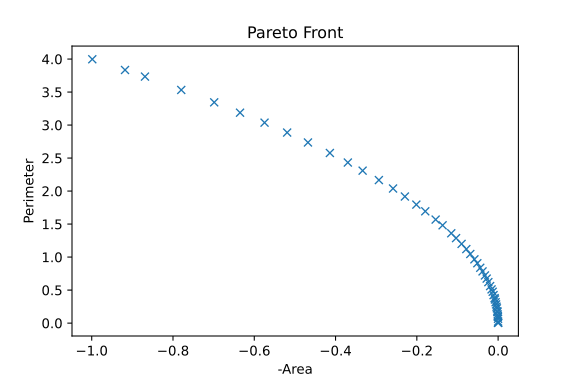
The following code block will extract results from the optimization and plot the Pareto front for this optimization. The pop.get_f() method returns a vector of the objective values for the optimization, while the pop.get_x() method returns the free variable tuples for the optimized population.
fig1=plt.figure()
plot1=plt.axes()
fig1.add_axes(plot1)
fits, vectors = pop.get_f(), pop.get_x()
ndf, dl, dc, ndr = pg.fast_non_dominated_sorting(fits)
plot1.plot(fits[ndf[0],0],fits[ndf[0],1],'x')
plot1.set_xlabel('Area')
plot1.set_ylabel('Perimeter')
plot1.set_title('Pareto Front')
pygmo provides a method to extract the Pareto in the method fast_non_dominated_sorting(fits), the returned ndf object is a list of the indexes for designs on the Pareto front. If the code was correctly implemented, then the results of the optimization should look similar to the following plot.
1.10. Conclusion
You have successfully completed your first optimization using eMach. This code can be modified to perform other simple optimizations. The user should attempt to modify the code to perform the following list of optimizations:
Optimize a circle for maximum area and minimum perimeter
Optimize a cuboid for maximum volume and minimum surface area
Optimize a sphere for maximum volume and minimum surface area