1. Thermal Resistance Network Analyzer
This analyzer solves steady state temperature distribution problems in thermal resistance networks. The analyzer resides in the mach_eval.analyzers.general.thermal_stator module.
1.1. Model Background
Thermal resistance networks are used to reduce the temperature distribution in a system into a set of nodes and thermal resistances. This is analogous to electrical resistance systems, where instead of V=IR it is dT=RQ where dT is the temperature rise, R is the thermal resistance, and Q is the heat flow.
This analyzer has the user specify fixed reference temperatures at one or more nodes, thermal resistances between nodes, and heat input at multiple nodes. The analyzer constructs the thermal network, solves it, and returns to the user the temperature at every node in the system. This analyzer is also utilized by other analyzers in eMach, i.e. SPM Rotor Thermal Analyzer.
1.1.1. Example Model
The image below shows an example thermal problem with its corresponding thermal resistance network overlayed on top.
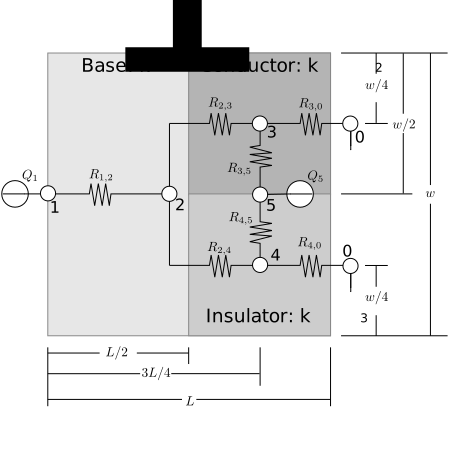
The example consists of the following:
Three hardware components: a “base”, a thermal “conductor,” and a thermal “insulator”
Two sources of heat: Q1at node 1 and Q5at node 5
Convection on the right side of the model with a convection coefficient of
h, represented by thermal resistances R3,0and R4,0Conduction within and between the hardware components, represented by all other thermal resistances R.
Depth into the page of d, width w, and length L.
The code necessary to solve this example is developed in the sections below.
1.1.2. Resistances
The thermal_stator module contains a set of classes for creating conduction and convection thermal resistances for the analyzer. These classes are now specified.
These resistance classes all implement the Resistance protocol defined within the module. Classes are provided for geometry that is typical of electric machines, including cylinders and rectangles. The conduction resistances are implemented using standard heat flow expressions. Three specialized convection resistance classes air_gap_conv, hub_conv, and shaft_conv implement models presented in this paper:
Howey, P. R. N. Childs and A. S. Holmes, “Air-Gap Convection in Rotating Electrical Machines,” in IEEE Transactions on Industrial Electronics, vol. 59, no. 3, pp. 1367-1375, March 2012.
All resistance classes initializers require at least three input arguments:
Node_1andNode_2. These areintobjects that indicate the nodes the resistance is connected between.Mat. This is aMaterialobject that holds the required material parameters. To initialize theMaterialclass:Simple Conductor:
my_mat = Material(k), wherekis the material thermal conductivity in units of W/m-K.Fluid Material:
my_mat = Material(k, cp, mu), wherecpis the specific heat in units of kJ/kg andmuis viscosity in units of m^2/s. These parameters can be passed in as named arguments.
The following resistance classes are provided in the thermal_network module:
1.1.2.1. plane_wall
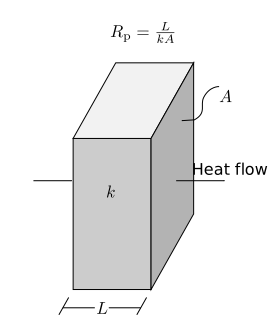
Class initializer signature: plane_wall(Material,Node_1,Node_2,L,A).
Node 1 is located on one of the walls perpendicular to the heat flow
Node 2 is located on the opposite face
Lthickness of plane wall [m]Across-sectional area of plane wall [m2]
1.1.2.2. cylind_wall
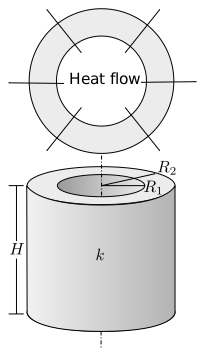
Class initializer signature: cylind_wall(Material,Node_1,Node_2,R_1,R_2,H).
Node 1 is located at the inner surface of the cylinder
Node 2 is located at the outer cylinder.
R_1radial location of node 1 [m]R_2radial location of node 2 [m]Hheight of cylindrical wall [m]
1.1.2.3. air_gap_conv
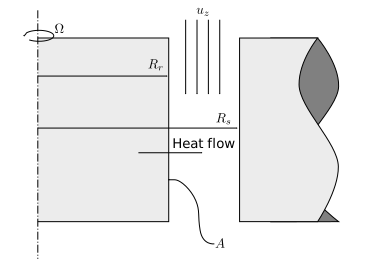
Class initializer signature: air_gap_conv(Material,Node_1,Node_2,omega,R_r,R_s,u_z,A).
Node 1 is located on the surface of the inner cylinder
Node 2 is located in the air-gap fluid
omegarotational speed [rad/s]R_router radius of rotor [m]R_sinner radius of stator [m]u_zaxial airflow velocity [m/s]Asurface area of rotor [m2]
1.1.2.4. hub_conv
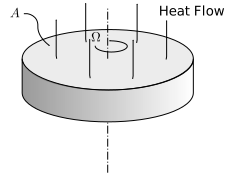
Class initializer signature: hub_conv(Material,Node_1,Node_2,omega,A).
Node 1 is located on the top surface of the cylinder
Node 2 is located in the fluid above the cylinder surface
omegarotational speed [rad/s]Aaxial surface area of rotor [m2]
1.1.2.5. shaft_conv
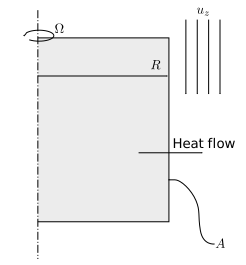
Class initializer signature: shaft_conv(Material,Node_1,Node_2,omega,R,A,u_z).
Node 1 is located on the surface of the cylinder
Node-2 is located in the fluid.
omegarotational speed [rad/s]Router radius of shaft [m]Aradial surface area of rotor [m2]u_zaxial airflow velocity [m/s]
1.1.2.6. conv
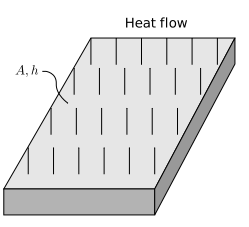
Class initializer signature: conv(Material,Node_1,Node_2,h,A).
Node 1 is located on the surface
Node-2 is located in the fluid
hconvection coefficient [W/m2-K]Aarea of convection surface [m2]
1.2. Input from User
The analyzer problem initializer requires the user to provide the following information:
Resistances: List ofResistanceobjects.Q_dot: List of heat sources for each node in unts of [W]. This list should beN_nodesin length, where the index of each entry determines which node the heat source is connected to.T_ref: List of pairs of reference nodes and temperatures[[ref_node_1,ref_temp_1],[ref_node_2,ref_temp_2]..]in units of [C]N_nodes: Number of nodes in the system
1.2.1. Example Code
Code is now provided to solve the example thermal problem provided in the Model Background section.
Import modules and define geometry.
import numpy as np
import scipy.optimize as op
from matplotlib import pyplot as plt
from matplotlib.patches import Rectangle
from eMach.mach_eval.analyzers.mechanical.thermal_network import *
#################
#Define Materials
#################

k_1=10 #Base Material Thermal Conductivity W/m-K
k_2=100 #Conductive Material Thermal Conductivity W/m-K
k_3=.01 #Insulating Material Thermal Conductivity W/m-K

mat1=Material(k_1)
mat2=Material(k_2)
mat3=Material(k_3)
##################
#Define Convection
##################
h=10 #Convection coefficient W/m^2-K
#################
#Define Geometry
#################

w=0.1 #Width m
L=.75 #Length m
d=.1 #Depth m

L_1=.5*L #Length of base
L_2=L*3/4 #Length to mid section 2 and 4
A_1=w*d #Cross sectional area of base
A_2=w*d/2 #Cross sectional area of section 2 and 3
A_3=(L-L_1)*d #Cross sectional Area between section 2 and 3
Create
Resistanceobjects for this example.
N_nodes=6 #Number of Nodes

###################
#Define Resistances
###################
Resistances = []
##############
# Path 0
##############
Descr = "R_1,2"
Resistances.append(plane_wall(mat1, 1, 2, L_1, A_1))
Resistances[0].Descr = Descr
##############
# Path 1
##############
Descr = "R_2,3"
Resistances.append(plane_wall(mat2, 2, 3, L_2-L_1, A_2))
Resistances[1].Descr = Descr

##############
# Path 2
##############
Descr = "R_2,4"
Resistances.append(plane_wall(mat3, 2, 4, L_2-L_1, A_2))
Resistances[2].Descr = Descr

##############
# Path 3
##############
Descr = "R_3,5"
Resistances.append(plane_wall(mat2, 3, 5, w/4, A_3))
Resistances[3].Descr = Descr

##############
# Path 4
##############
Descr = "R_4,5"
Resistances.append(plane_wall(mat3, 4, 5, w/4, A_3))
Resistances[4].Descr = Descr

##############
# Path 5
##############
Descr = "R_3,0"
Resistances.append(conv(None, 3, 0, h, A_2))
Resistances[5].Descr = Descr

##############
# Path 6
##############
Descr = "R_4,0"
Resistances.append(conv(None, 4, 0, h, A_2))
Resistances[6].Descr = Descr
Specify the heat sources at nodes 1 and 5.
####################
#Define Heat Sources
####################
Q_dot=[0,]*N_nodes #create a list of 0's of length N_nodes
Q_dot[1]=10 #W
Q_dot[5]=10 #W
Specify the temperature at the reference node. For this example, only one reference temperatures is used (at node 0).
######################
#Define Reference Temps
######################
ref_node=0
ref_temp=25 #C
T_ref=[[ref_node,ref_temp],]
Create the problem and analyzer.
############################
#Create Problem and Analzyer
############################
prob=ThermalNetworkProblem(Resistances,Q_dot,T_ref,N_nodes)
ana=ThermalNetworkAnalyzer()
1.3. Output to User
The analyzer returns a list consisting of the temperature at each node of the resistance network in units of [C].
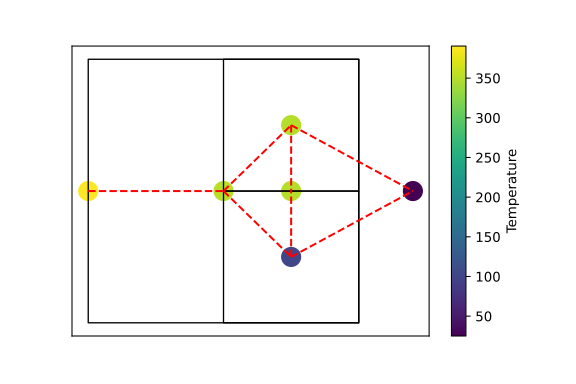
Example code to analyze the problem and graphically depict the temperature distribution of the nodes:
############################
#Analyze the Problem
############################
T=ana.analyze(prob)

############################
#Make Plot
############################
x=[L*1.2,0,L_1,L_2,L_2,L_2]
y=[0,0,0,w/4,-w/4,0]
fig,ax=plt.subplots(1,1)
c1=ax.scatter(x,y,c=T,s=200)
h=fig.colorbar(c1,label='Temperature')
# Create a Rectangle patch
rect = Rectangle((0,-w/2),L,w,linewidth=1,edgecolor='k',facecolor='none')
# Add the patch to the Axes
ax.add_patch(rect)
# Create a Rectangle patch
rect = Rectangle((L_1,0),L-L_1,w/2,linewidth=1,edgecolor='k',facecolor='none')
# Add the patch to the Axes
ax.add_patch(rect)
# Create a Rectangle patch
rect = Rectangle((L_1,-w/2),L-L_1,w/2,linewidth=1,edgecolor='k',facecolor='none')
# Add the patch to the Axes
ax.add_patch(rect)
ax.plot([x[1],x[2]],[y[1],y[2]],'r--')
ax.plot([x[2],x[3]],[y[2],y[3]],'r--')
ax.plot([x[2],x[3]],[y[2],y[4]],'r--')
ax.plot([x[3],x[5]],[y[3],y[5]],'r--')
ax.plot([x[4],x[5]],[y[4],y[5]],'r--')
ax.plot([x[3],x[0]],[y[3],y[0]],'r--')
ax.plot([x[4],x[0]],[y[4],y[0]],'r--')
ax.set_yticks([])
ax.set_xticks([])