2. Analytical Machine Design Tutorial
Goal: Understand the base
mach_evalclassesComplexity 3/5
Estimated Time 30 min
This tutorial demonstrates how to set up a MachineDesigner and implement EvaluationSteps from the mach_eval module. By the end of this tutorial you will be able to:
Create a
MachineDesignerfor modeling an electric machine.Define
EvaluationStepsto describe an evaluation process for an electric machine
The example classes used in this tutorial are chosen to illustrate the machine topology specification and evaluation process in a simple manner and are not intended to accurately model any physical details.
2.1. Tutorial Requirements
Prior to starting this tutorial, the user must configure their system with the following:
All required Python packages are installed on system. (See Pre-requisites)
eMachinstalled as a sub-module in a root folder of a git repository (See Rectangle Example)
2.2. Step 1: Create Python file for tutorial
In the root folder of your private Git repository (the repository that houses eMach as a submodule), create a new Python file mach_eval_tutorial.py to hold the code for this tutorial.
2.3. Step 2: Define import statements
Add the following import statements to the newly created mach_eval_tutorial.py file to load the required modules for this tutorial:
import numpy as np
from matplotlib import pyplot as plt
from eMach import mach_eval as me
from copy import deepcopy
2.4. Step 3: Define Machine Class
In this step, the Machine class is defined. This class is intended to act as a “Digital Twin” of a physical machine, which means it is designed to hold all the relevant information about a physical machine (i.e., geometric, material, and nameplate information). This class can be thought of as “what is on the desk.” Items such as operating conditions and other information needed to perform analysis are housed in the Settings class (defined in a later step).
The creation of the Machine class is split into five sub-steps: initialization, class constant parameters, input defined parameters, derived parameters, and auxiliary functions.
2.4.1. Step 3.1: Initialization
Copy and paste the following code block into your mach_eval_tutorial.py file to create a Machine class entitled ExampleMachineQ6p1y3. This code is used to initialize an object of the class. It takes in a set of geometric variables and material dictionaries and saves them to local variables within the object.
This class has been named ExampleMachineQ6p1y3 to tell the user that it describes a machine with 6 stator slots, 2 rotor poles, and a coil span of 3 slots. Descriptive names like this are helpful for creating clean and understandable code.
Notice the use of the _ character at the start of the local variable names. This is a naming convention in Python that informs users that these variables should be considered private and should therefore not be editted by code that resides outside of the ExampleMachineQ6p1y3 class.
Finally, note that this class is implementing the protocol me.Machine.
class ExampleMachineQ6p1y3(me.Machine):
    def __init__(self,r_ro,d_m,d_ag,l_tooth,
                    w_tooth,d_yoke,z_q,l_st,
                    magnet_mat,core_mat,coil_mat):
        self._r_ro = r_ro
        self._d_m = d_m
        self._d_ag = d_ag
        self._l_tooth=l_tooth
        self._w_tooth = w_tooth
        self._d_yoke = d_yoke
        self._z_q = z_q
        self._l_st = l_st
        self._magnet_mat= magnet_mat
        self._core_mat = core_mat
        self._coil_mat = coil_mat
2.4.2. Step 3.2: Class Constant Parameters
Copy and paste the following code block into your ExampleMachineQ6p1y3 class to create read-only parameters for the class. This code should be at the same indent level as the __init__ function. The step illustrates adding constant parameters to the Machine class.
When creating Machine classes, users may desire to create read-only, constant values for the machine. In this example, the number of slots Q, pole-pairs p, and the coil span y of the machine are constant. To accomplish this, the @property decorator is used to define these values to make these “read-only.” By coding in literal return values (instead of variable names), these properties are constants.
@property
def Q(self):
    return 6
@property
def p(self):
    return 1
@property
def y(self):
    return 3
2.4.3. Step 3.3: Input Defined Parameters
Copy and paste the following code block into the ExampleMachineQ6p1y3 class. This step demonstrates how the @property decorator can be used to expose “read-only” variables.
In step 3.1, the inputs to the initialization function were defined so that they were assigned to a self._ property. The code that you have copy-and-pasted in this step uses property decorators to allow reading the values of these variables.
@property
def r_ro(self):
    return self._r_ro
@property
def d_m(self):
    return self._d_m
@property
def d_ag(self):
    return self._d_ag
@property
def l_tooth(self):
    return self._l_tooth
@property
def w_tooth(self):
    return self._w_tooth
@property
def d_yoke(self):
    return self._d_yoke
@property
def z_q(self):
    return self._z_q
@property
def l_st(self):
    return self._l_st
@property
def magnet_mat(self):
    return self._magnet_mat
@property
def core_mat(self):
    return self._core_mat
@property
def coil_mat(self):
    return self._coil_mat
2.4.4. Step 3.4: Derived Parameters
Copy and paste the following code block into to the ExampleMachineQ6p1y3 class. This code demonstrates how the @property decorator can also be used to expose parameters that are defined as a function of multiple variables.
It is frequently convenient to define certain machine parameters in terms of other parameters. For example, while the geometry of a machine stator can be defined strictly based on the variables passed into the initializer (Step 3.1), this can be cumbersome to interpret and it can be useful to have quick access to derived properties, such as the inner stator radius (r_si below).
@property
def r_si(self):
    return self._r_ro+self._d_ag
@property
def r_sy(self):
    return self.r_si+self._l_tooth
@property
def r_so(self):
    return self.r_sy+self._d_yoke
@property
def B_delta(self):
    return self.d_m*self.magnet_mat['B_r']/(self.magnet_mat['mu_r']*self.d_ag+self.d_m)
@property
def B_sy(self):
    return np.pi*self.B_delta*self.r_si/(2*self.p*(self.d_yoke))
@property
def B_th(self):
    return self.B_delta*self.r_si*self.alpha_q/(self.w_tooth)
@property
def k_w(self):
    alpha=np.pi*((self.Q-2*self.y)/(self.Q*self.p))
    n=self.Q/(2*self.p)
    m=self.Q/(6*self.p)
    Beta=np.pi/n
    k_w=np.cos(alpha/2)*(np.sin(m*Beta/2))/(m*np.sin(Beta/2))
    self._k_w=k_w
    return self._k_w
@property
def A_slot(self):
    return np.pi*(self.r_sy**2-self.r_si**2)/self.Q - \
        self.w_tooth*(self.r_sy-self.r_si)
@property
def alpha_q(self):
    return 2*np.pi/self.Q
2.4.5. Step 3.5: Auxiliary Functions
Copy and paste the following code block into to the ExampleMachineQ6p1y3 class. This code illustrates the use-case for auxiliary functions added to a Machine class to facilitate calculation of performance properties.
There are several useful machine performance calculations which require combining information from within a Machine class and information that a Machine class does not contain. Auxiliary functions can be added to facilitate easy implementation of these calculations. Examples of this include electric loading A_hat and tip speed v_tip, both of which depend on outside information (i.e. current and speed).
def A_hat(self,I):
    N=self.Q/3
    A_hat=3*self.z_q*N*self.k_w*I/(np.pi*self.r_si)
    return A_hat
def v_tip(self,Omega):
    v_tip=Omega*self.r_ro
    return v_tip
2.5. Step 4: Define Settings Class
Copy and paste the following code block to create a settings class that can be used alongside the ExampleMachineQ6p1y3 machine.
mach_eval uses settings clases to hold information necessary for analyzing the machine, such as the current operating condition. In this tutorial, the settings class simply holds the rotational speed Omega and the motor phase current I.
class ExampleSettings:
    def __init__(self,Omega,I):
        self.Omega=Omega
        self.I=I
2.6. Step 5: Define the Architect
The Architect class of the mach_eval module is described in detail here. The purpose of the Architect is to convert an input tuple (which is presumably set up to compactly encode the free variables of an optimization) into a Machine object (which likely requires far more information than is contained by the free variables). For this example, the input tuple is defined using the following:
x[0] = r_roOuter rotor radiusx[1] = d_m_normNormalized magnet thicknessx[2] = l_st_normNormalized stack lengthx[3] = r_sy_normNormalized stator yoke radiusx[4] = r_so_normNormalized outer rotor radiusx[5] = w_tooth_normNormalized tooth widthx[6] = z_qNumber of turnsx[7] = IStator current
Copy the following code into the Python file to implement the example architect.
The create_new_design method demonstrates how the input tuple values are interpretted to initialize an instance of the ExampleMachineQ6p1y3 class. Notice that material dictionaries (magnet_mat, core_mat, and coil_mat) are provided to the ExampleMotorArchitect upon initialization. This is the typical programming pattern for providing information that is required to create a Machine class but is not contained in the input tuple.
class ExampleMotorArchitect(me.Architect):
    """Class converts input tuple x into a machine object"""
    def __init__(self,magnet_mat,core_mat,
                    coil_mat):
        self.magnet_mat=magnet_mat
        self.core_mat=core_mat
        self.coil_mat=coil_mat
    def create_new_design(self,x:tuple):
        r_ro=x[0]
        d_m_norm=x[1]
        d_m=d_m_norm*r_ro
        l_st=x[2]*r_ro
        r_sy_norm=x[3]
        r_so_norm=x[4]
        w_tooth_norm=x[5]
        z_q=x[6]

        d_ag=.002
        Q=6

        r_si=r_ro+d_ag
        alpha_q=2*np.pi/Q
        w_tooth=2*r_si*np.sin(w_tooth_norm*alpha_q/2)
        r_so=r_so_norm*r_si
        r_sy=r_sy_norm*(r_so-r_si)+r_si
        d_yoke=r_so-r_sy
        l_tooth=r_sy-r_si


        machine=ExampleMachineQ6p1y3(r_ro,d_m,d_ag,l_tooth,
                    w_tooth,d_yoke,z_q,l_st,
                    self.magnet_mat,self.core_mat,self.coil_mat)

        return machine
2.7. Step 6: Define the SettingsHandler
The SettingsHandler class of the mach_eval module is also described in detail in the user guide. The SettingsHandler has a similar purpose to the Architect (step 5) in that it is responsible for converting the input tuple into the settings object.
Copy the following code into the Python file to implement the example SettingsHandler. In this tutorial, the SettingsHandler takes in a rotational speed Omega on initialization and extracts the current from the input tuple to create the ExampleSettings.
class ExampleSettingsHandler(me.SettingsHandler):
    """Settings handler for design creation"""
    def __init__(self,Omega):
        self.Omega=Omega
    def get_settings(self,x:tuple):
        I=x[7]
        settings = ExampleSettings(self.Omega,I)
        return settings
2.8. Step 7: Define the EvaluationStep s
The EvaluationStep protocol of the mach_eval module defines a function signature called step. This is the base level for an evaluation in the mach_eval module and is used to define an evaluation that is performed on a design. A detailed explanation of the EvaluationStep protocol and the associated State class is provided here.
Copy and paste the following code to add two evaluation steps. These steps are used to calculate the total power of the machine and the expected losses. Per the EvaluationStep protocol, each step class must contain a step method that takes in a state variable, performs some analysis, and returns the results along with an output state. The deepcopy method is used to provide a copy of the state which can be updated with new information without changing the input state.
class PowerEvalStep(me.EvaluationStep):
    def step(self,state_in):
        #unpack the input state
        B_delta=state_in.design.machine.B_delta
        r_ro=state_in.design.machine.r_ro
        l_st=state_in.design.machine.l_st
        I=state_in.design.settings.I
        A_hat=state_in.design.machine.A_hat(I)
        Omega=state_in.design.settings.Omega

        #perform evaluation
        V_r=np.pi*r_ro**2*l_st
        Power=Omega*V_r*B_delta*A_hat

        #write the state out
        state_out=deepcopy(state_in)
        state_out.conditions.Power=Power
        return [Power,state_out]

class LossesEvalStep(me.EvaluationStep):
    def step(self,state_in):
        w_tooth=state_in.design.machine.w_tooth
        l_tooth=state_in.design.machine.l_tooth
        alpha_q=state_in.design.machine.alpha_q
        r_si=state_in.design.machine.r_si
        r_so=state_in.design.machine.r_so
        r_sy=state_in.design.machine.r_sy
        I=state_in.design.settings.I
        z_q=state_in.design.machine.z_q
        A_slot=state_in.design.machine.A_slot
        k_fill=state_in.design.machine.coil_mat['k_fill']
        sigma=state_in.design.machine.coil_mat['sigma']
        k_ov=state_in.design.machine.coil_mat['k_ov']
        l_st=state_in.design.machine.l_st
        Omega=state_in.design.settings.Omega
        p=state_in.design.machine.p
        y=state_in.design.machine.y
        Q=state_in.design.machine.Q
        K_h=state_in.design.machine.core_mat['core_ironloss_Kh']
        b=state_in.design.machine.core_mat['core_ironloss_b']
        a=state_in.design.machine.core_mat['core_ironloss_a']
        K_e=state_in.design.machine.core_mat['core_ironloss_Ke']
        k_stack=state_in.design.machine.core_mat['core_stacking_factor']
        B_sy=state_in.design.machine.B_sy
        B_tooth=state_in.design.machine.B_th

        l_turn=2*l_st+y*alpha_q*(r_si+r_sy)*k_ov
        f=p*Omega/(2*np.pi)
        g_sy=(K_h*(f**a)*(B_sy**b) + K_e*(f*B_sy)**2)*k_stack
        g_th=(K_h*(f**a)*(B_tooth**b) + K_e*(f*B_tooth)**2)*k_stack
        A_cond=k_fill*A_slot/z_q
        J_hat=I/A_cond
        Q_tooth=g_th*w_tooth*l_st*l_tooth*Q
        Q_sy=g_sy*np.pi*(r_so**2-r_sy**2)*l_st
        Q_coil= (J_hat**2)*l_turn*k_fill*A_slot/(sigma*2)
        state_out=deepcopy(state_in)
        state_out.conditions.losses=[Q_tooth,Q_sy,Q_coil]
        return [[Q_tooth,Q_sy,Q_coil],state_out]
2.9. Step 8: Define Material Dictionaries
Copy and paste the following material dictionaries into mach_eval_tutorial.py. These dictionaries hold standard material information needed to model that machine.
core_mat = {
    'core_material'              : 'M19Gauge29',
    'core_material_density'      : 7650, # kg/m3
    'core_youngs_modulus'        : 185E9, # Pa
    'core_poission_ratio'        : .3,
    'core_material_cost'         : 17087, # $/m3
    'core_ironloss_a'            : 1.193,# freq
    'core_ironloss_b'            : 1.918,# field
    'core_ironloss_Kh'           : 55.1565, # W/m3
    'core_ironloss_Ke'           : 0.050949, # W/m3
    'core_therm_conductivity'    : 28, # W/m-k
    'core_stacking_factor'       : .96, # percentage
    'core_saturation_feild'      : 1.6 #T
    }

coil_mat = {
    'Max_temp'                   : 150, # Rise C
    'k_ov'                       : 1.8,
    'sigma'                      : 5.80E7,
    'k_fill'                     : .38}
magnet_mat = {
    'magnet_material'            : "Arnold/Reversible/N40H",
    'magnet_material_density'    : 7450, # kg/m3
    'magnet_youngs_modulus'      : 160E9, # Pa
    'magnet_poission_ratio'      :.24,
    'magnet_material_cost'       : 712756, # $/m3
    'magnetization_direction'    : 'Parallel',
    'B_r'                        : 1.285, # Tesla, magnet residual flux density
    'mu_r'                       : 1.062, # magnet relative permeability
    'magnet_max_temperature'     : 80, # deg C
    'magnet_max_rad_stress'      : 0, # Mpa
    'magnet_therm_conductivity'  : 8.95, # W/m-k
    }
2.10. Step 9: Creating MachineDesigner
The next step is to create an object of the MachineDesigner class. This is a concrete class provided by mach_eval to hold an Architect (created in step 5) and a SettingsHandler (created in step 6). The MachineDesigner.create_design() method receives an input tuple (the free variables) and uses the Architect and SettingsHandler to create a Machine and Settings object. The function returns a Design object containing the Machine and Settings (design.machine and design.setttings).
Copy and paste this code into the bottom of the Python file.
Omega=100
arch=ExampleMotorArchitect(magnet_mat,core_mat,coil_mat)
settings_handler=ExampleSettingsHandler(Omega)
des=me.MachineDesigner(arch,settings_handler)
r_ro=.1
d_m_norm=.0025
l_st_norm=5
r_sy_norm=.25
r_so_norm=10
w_tooth_norm=.8
z_q=100
I=20
x=[r_ro,d_m_norm,l_st_norm,r_sy_norm,r_so_norm,w_tooth_norm,z_q,I]
design=des.create_design(x)
2.11. Step 10: Creating MachineEvaluator
Like the MachineDesigner in the previous step, the MachineEvaluator is a concrete class provided by mach_eval. This class takes in an ordered list of EvaluationSteps on initialization. When the evaluate method is called the MachineEvaluator will loop over the step functions of the provided EvaluationSteps in order. The results of the evaluate method will be an ordered list of [state_in,results,state_out] for each step provided. This gives a useful log of how the design and state objects have changed over the evaluation process.
The following code implements the two example EvaluationSteps provided, and demonstrates how to initialize the MachineEvaluator. Copy this code into the bottom of the Python file and hit run. The results object from the evaluation of the machine should be printed in the console.
power_step=PowerEvalStep()
loss_step=LossesEvalStep()
evaluator=me.MachineEvaluator([power_step,loss_step])
results=evaluator.evaluate(design)
print(results)
2.12. Step 11: Interpreting Results
The results of the optimization printed in the console are interpreted in this step. The results object is an ordered list of input states, results, and output states corresponding to each evaluation step. The output state of a step and the input state of the next step are identical, this provides an accounting of how the state object may change during the optimization.
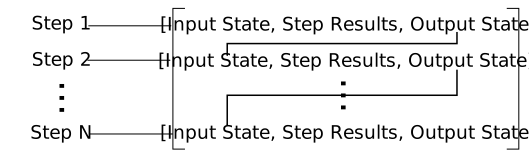
The results of the example code should look like the following. The form shown in the image above can be seen here, for example for the first evaluation step it is input state, results of power evaluation step of 7.96kW then output state. The same can be seen for the second step, where the losses are provided as [Q_tooth, Q_sy , Q_coil]
[[<eMach.mach_eval.mach_eval.State object at 0x000001CF936D7100>, 7960.007929035136, <eMach.mach_eval.mach_eval.State object at 0x000001CF936D7370>],
[<eMach.mach_eval.mach_eval.State object at 0x000001CF936D7850>, [2.8976596216446304, 2.78480754750738, 9.476525268802455],
<eMach.mach_eval.mach_eval.State object at 0x000001CF936D7AF0>]]
2.13. Conclusion
You have successfully completed this tutorial of the base capabilities of the mach_eval module. The following tasks are provided to demonstrate you understand how these classes work:
Create a new
EvaluationStepwhich calculates the motor efficiencyCopy and modify the example
MachineandArchitectclasses to analyze a Q12p2y3 machine, could these classes be modified to use the same architect?Bonus task: Using the skills learned in the Previous tutorial, can you create a simple optimization using the provided
MachineDesignerandMachineEvaluator?