3. Analytical Machine Optimization Tutorial
Goal: Understand Analysis steps, and integration of
mach_evalandmach_optComplexity 3/5
Estimated Time 30 min
This tutorial will introduce the AnalysisStep protocols and demonstrate how the functionality of mach_eval can be integrated with mach_opt. A machine topology will be optimized to maximize both the output power and power density, while keeping the tip speed and the stator temperature within the given limits. By the end of this tutorial you will be able to:
Create
AnalysisStepsto define complex analysis steps in the evaluation processIntegrate
mach_evalclass with the optimization tools ofmach_opt
The classes used in the example represent a simplified machine topology and evaluation process which is not accurate to real physics. The purpose of this document is to demonstrate how these classes are created and interact.
3.1. Tutorial Requirements
This tutorial requires that eMach and the associated packages are installed:
All required Python packages are installed on system. (See Pre-requisites)
eMachinstalled as a sub-module in a root folder of a git repository (See Rectangle Example)Completion of the Rectangle Tutorial and Analytical Machine Design Tutorial.
3.2. Step 1: Open Previous Tutorial File
This tutorial will use the classes created in the analytical machine design tutorial. The instructions are written so that tutorial participants modify the previously-created mach_eval_tutorial.py.
3.3. Step 2: Update Import Statements
At the top of the mach_eval_tutorial.py file, add the following import statements to add the required modules for this tutorial.
from eMach import mach_opt as mo
import pygmo as pg
3.4. Step 3: Add Constraints Step
The following class defines an additional EvaluationStep introduced in the analytical machine design tutorial. This step is designed to check if the tip speed of the rotor exceeds an upper bound. This class introduces a new tool: the mo.InvalidDesign exception. This is an exception defined in the mach_opt repository that when raised will exit the evaluation process in the fitness method of the MachineDesignProblem class and return back large objective values. This effectively acts as a death penalty constraint for the optimization and allows for invalid designs to be discarded during the evaluation process. Copy this code into the mach_eval_tutorial.py file near the other EvalutationSteps.
class ConstraintCheckStep(me.EvaluationStep):
    def __init__(self,v_tip_limit):
        self.v_tip_limit=v_tip_limit
    def step(self,state_in):
        r_ro=state_in.design.machine.r_ro
        Omega=state_in.design.settings.Omega
        v_tip=r_ro*Omega
        if v_tip > self.v_tip_limit:
            raise mo.InvalidDesign(message='Excessive tip speed')
        state_out=deepcopy(state_in)
        state_out.conditions.v_tip=v_tip
        results=v_tip
        return [results,state_out]
3.5. Step 4: Define AnalysisStep
The AnalysisStep class of mach_eval is a concrete class which implements the EvaluationStep protocol (see here). This class defines three protocols it must take in on initialization:
ProblemDefinitionAnalyzerPostAnalyzer
The example provided in this step will demonstrate the functionality of these protocols and their role in defining the AnalysisStep functionality for a simple thermal analysis.
3.5.1. Step 4.1: ProblemDefinition
The ProblemDefinition protocol is designed to convert the input state the AnalysisStep receives into a problem class which the Analyzer can use. The purpose for this class is to allow for Analyzers to be written generally, not in respect to a specific optimization. By parsing the state object into a set problem, the Analyzer does not need to interact with any superfluous information contained in the state object.
In this example, the problem defined by the Analyzer (discussed in the following sub-step) is given in the following code block. The problem class effectively acts as a container of relevant information for the Analyzer. Copy this code into the mach_eval_tutorial.py file near the other class definitions.
class ThermalProblem():
    def __init__(self,losses,A_so,h,T_out):
        self.losses=losses,
        self.A_so=A_so
        self.h=h
        self.T_out=T_out
The implementation of the ProblemDefinition protocol is provided in the following code block. This protocol requires that the developer implement a single method, get_problem, which converts the input state to the problem object. Copy this code into the mach_eval_tutorial.py file under the ThermalProblem class.
class ThermalProblemDefinition(me.ProblemDefinition):
    def __init__(self,h,T_out):
        self.h=h
        self.T_out=T_out
    def get_problem(self,state:'me.State')->'me.Problem':
        losses=state.conditions.losses
        r_so=state.design.machine.r_so
        l_st=state.design.machine.l_st
        A_so=2*np.pi*r_so*l_st

        problem=ThermalProblem(losses,A_so,self.h,self.T_out)
        return problem
3.5.2. Step 4.2: Analyzer
As mentioned in the previous sub-step, the Analyzer protocol is designed to allow for modular, generalized, and reusable analysis code that is capable of studying aspects of multiple machine types. It usually makes sense to create an Analyzer for code that is lengthy enough to warrant the added complexity over the EvaluationStep protocol and/or is likely to be useful to other developers to study multiple machine types. mach_eval comes with many Analyzer classes already provided (browse the Analyzers section of the table of contents). Developers are encouraged to contribute their analyzers to this collection for the benefit of others.
The only required method of the Analyzer protocol is the analyze method, which takes in a problem object and returns results of the analysis. Though not explicitly checked, each analyzer will have a problem class it is associated with, which defines the information that the analyzer needs. The example analyzer for this tutorial is provided in the following code block. The class checks to see if the temperature rise of the stator will exceed the maximum allowable temperature. If this occurs, the analyzer raises the mo.InvalidDesign exception. Paste this code under the ThermalProblemDefinition class in the mach_eval_tutorial.py file.
class ThermalAnalyzer(me.Analyzer):
    def __init__(self,T_limit):
        self.T_limit=T_limit
    def analyze(self,problem:'me.Problem'):
        A_so=problem.A_so
        h=problem.h
        losses=problem.losses
        T_out=problem.T_out
        T_stator=(1/(A_so*h))*np.sum(losses)+T_out

        if T_stator>self.T_limit:
            raise mo.InvalidDesign(message='Excessive Temperature')
        else:
            return T_stator
3.5.3. Step 4.3: PostAnalyzer
The PostAnalyzer class can be thought of as the inverse of the ProblemDefinition class: it converts the results of the analysis step back into a state object. The PostAnalyzer protocol requires that this class implement a get_next_state method to receive results from the Analyzer and the input state passed to the ProblemDefinition and return a new state object. The implementation of the PostAnalyzer should utilize the deepcopy function as described in the previous tutorial. Copy the following code block into the mach_eval_tutorial.py file under the ThermalAnalyzer class.
class ThermalPostAnalyzer(me.PostAnalyzer):
    def get_next_state(self,results,stateIn:'me.State')->'me.State':
        stateOut=deepcopy(stateIn)
        stateOut.conditions.T_stator=results
        return stateOut
3.6. Step 5: Create DesignSpace
In this step, a DesignSpace class is created to configure the optimization workflow. The optimization is intended to maximize power and power density. The example code demonstrates how the results returned by the MachineEvaluator of mach_eval can be utilized by the DesignSpace class of the mach_opt module.
Copy the following code into the mach_eval_tutorial.py file to define the DesignSpace for this example.
class ExampleMachineDesignSpace(mo.DesignSpace):
    """Class defines objectives of machine optimization"""

    def __init__(self,bounds,n_obj):
        self._n_obj=n_obj
        self._bounds=bounds

    def get_objectives(self, full_results) -> tuple:
        last_results=full_results[-1]
        last_state=last_results[-1]
        power=last_state.conditions.Power
        r_so=last_state.design.machine.r_so
        l_st=last_state.design.machine.l_st
        V_s=np.pi*r_so**2*l_st
        power_den=power/V_s
        return (-power,-power_den)

    def check_constraints(self, full_results) -> bool:
        return True

    @property
    def n_obj(self) -> int:
        return self._n_obj

    @property
    def bounds(self) -> tuple:
        return self._bounds
Note
The results of the MachineEvaluator are an ordered list of [input_state, evaluation results, output_state] for each EvaluationStep which is injected. The DesignSpace class often needs only to access the last state of the evaluation process. The code last_results=full_results[-1] and last_state=last_results[-1] provide the user easy access to the final state of the evaluation process.
Once again, a dummy DataHandler is defined for this tutorial. Copy the following code into the mach_eval_tutorial.py file.
class DataHandler:
    def save_to_archive(self, x, design, full_results, objs):
        """Unimplemented data handler"""
        pass
    def save_designer(self, designer):
        pass
3.7. Step 6: Run the optimization
In order to run the optimization, the new classes must be initialized, and the evaluator must be modified to include the new steps. Modify the code at the bottom of the mach_eval_tutorial.py file to include the following when defining the MachineEvaluator. Note that the new steps are injected into the list of EvalutationSteps
v_tip_limit=200
const_step=ConstraintCheckStep(v_tip_limit)
h=10
T_out=25
T_limit=50
problem_def=ThermalProblemDefinition(h, T_out)
analyzer=ThermalAnalyzer(T_limit)
post_analyzer=ThermalPostAnalyzer()
thermal_step=me.AnalysisStep(problem_def, analyzer, post_analyzer)
evaluator=me.MachineEvaluator([const_step,power_step,loss_step,thermal_step])
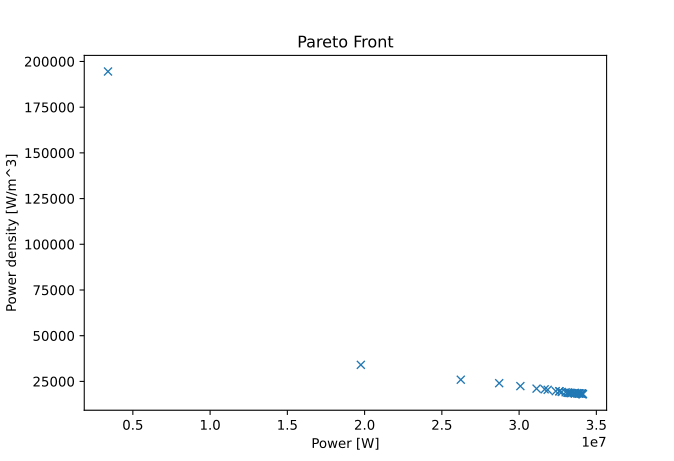
The following code initializes the DataHandler and DesignSpace classes, and then injects them into the DesignProblem of the mach_opt module. The DesignProblem class is then used to create the optimization and the results are plotted.
dh=DataHandler()

bounds=([0.001,0,0,0,1,0.1,0,0],
        [1,1,6,1,10,1,100,100])
n_obj=2
## Inject bounds and number of objectives into DesignSpace
ds=ExampleMachineDesignSpace(bounds,n_obj)

#Create Machine Design Problem
machDesProb=mo.DesignProblem(des,evaluator,ds,dh)

#Run Optimization
opt=mo.DesignOptimizationMOEAD(machDesProb)
pop_size=100
pop=opt.initial_pop(pop_size)
pop=opt.run_optimization(pop,40)
#Plot Pareto front
fig1=plt.figure()
plot1=plt.axes()
fig1.add_axes(plot1)
fits, vectors = pop.get_f(), pop.get_x()
ndf, dl, dc, ndr = pg.fast_non_dominated_sorting(fits)
plot1.plot(-fits[ndf[0],0],-fits[ndf[0],1],'x')
plot1.set_xlabel('Power [W]')
plot1.set_ylabel('Power density [W/m^3]')
plot1.set_title('Pareto Front')
plt.savefig('ParetoFront.svg')
If the code was correctly implemented, the results of the optimization should look similar to the following plot.
3.8. Conclusion
You have successfully completed this tutorial to demonstrate the full functionality of the mach_eval module and its connection to the optimization framework of mach_opt. You are now ready to create your own optimization workflows using eMach.